
What is a VPN server
In this article we will answer the most frequently asked questions what is a VPN server, can tell whether to increase your safety using VPN, when you must use Double VPN and how to check whether the VPN service records logs, as well as any modern technology exists to protect personal information.
VPN is a virtual private network, which provides encryption between the client and the VPN server.
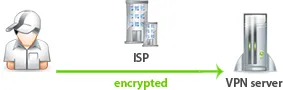
The main purpose of VPN is a traffic encryption and change the IP address.
Let's see why and when it is needed.
Why VPN needs
All Internet service providers (ISP) to log the activities of their customers on the Internet. That is, the ISP knows what web-sites you have visited. This is to ensure that in the event of police requests to give all the information about the user, as well as to remove all legal responsibility for the actions of the user.
There are many situations where the user needs to protect their personal data on the Internet and get the freedom of communication.
Example 1. There is a business and you need to transfer sensitive data over the Internet, so no one can intercept them. Most companies use VPN technology to transfer information between branches of companies.
Example 2. Many services on the Internet run on the basis of geo-referenced to the area and prohibit access to users from other countries.
For example, service BBC UK only works for IP addresses from United Kingdom. Accordingly, all the English-speaking people living in other countries does not have access to this service.
Example 3. Blocking certain web-sites in the office and in the country. Most offices are blocking access to social networks, so that workers do not spend working time on communication.
For example, China has blocked many Google services. If you live in China and working with the company in Europe, there is a need to use services such as Google Disk.
Example 4. Hide visited web-sites from an Internet provider. There are times when you want to hide the list of visited web-sites from an Internet provider. All traffic will be encrypted.
How VPN works
Due to the traffic encryption your ISP will not know which web-sites you visit on the Internet. In this case your IP address on the Internet will belong to the country of VPN server.
When you connect to a VPN a secure channel will be created between your computer and the VPN server. All data on this channel is encrypted.
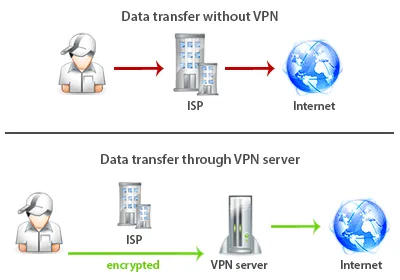
Through the VPN, you get the freedom to communicate and protect own personal information.
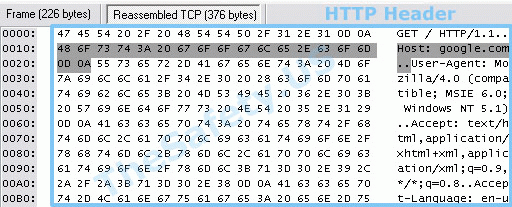
At the logs of ISP will be a set of different characters. The picture below shows the analysis of data from a special program.
The HTTP header is immediately obvious to any website you are connecting to. These data are recorded by ISPs.
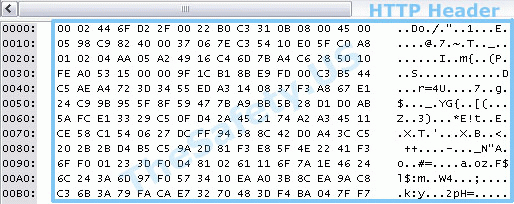
The following picture shows the HTTP header when using VPN. Data is encrypted and it is impossible to know which websites you have visited.
How to connect to the VPN
There are several ways to connect to the VPN network.
- PPTP is an out-of-date protocol. Most modern OS has excluded it from the list of supported. PPTP cons - poor connection stability. The connection may end and unprotected data can go online.
- L2TP (IPSec) connection is characterized by greater reliability. Also built into most operating systems (Windows, Mac OS, Linux, iOS, Android, Windows Phone, etc.). It features better reliability unlike PPTP connections.
- SSTP connection has been developed relatively recently. It is only supported on Windows, so did not get wide distribution.
- IKEv2 is a modern protocol based on IPSec. This protocol replaced the PPTP protocol and is supported by all popular OS.
- OpenVPN connection is considered to be the most reliable. This technology can be flexibly set up and in the fall OpenVPN connection blocks sending unprotected data on the Internet.
We recommend to you use OpenVPN technology.
There are 2 data transfer protocols for OpenVPN technologies:
- UDP protocol has fast work (recommended for VoiP telephony, Skype, online games)
- TCP protocol is characterized by the reliability of the transmitted data (requires acknowledgment of receipt of the package). It works a little slower than UDP.
How to configure a VPN
Setting up a VPN connection takes a few minutes and depend on type of connection.
We are using PPTP and OpenVPN connection.
We recommend that you use OpenVPN connection, since it is the most reliable.
See detailed manuals of VPN configuration for all operating systems.
Security of a VPN software
We always talk about a comprehensive approach to security. User safety consist of not only one VPN connection. It is important to what software you use to connect to the VPN server.
Currently, the services offer convenient VPN client. It is a program that facilitates setup a VPN connection. We do offer a convenient VPN client. Through such programs a VPN connection setup takes less than 1 minute.
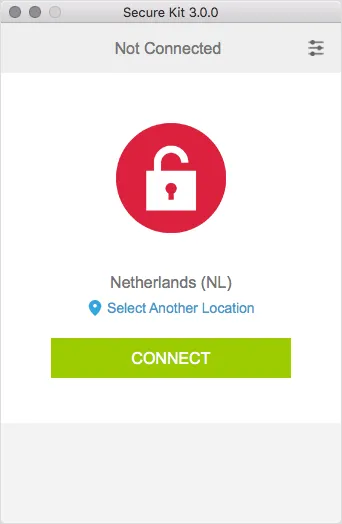
When we started to engage in the provision of VPN services in 2006, all of our users to configure OpenVPN official application. It is open source. Of course, setting the official OpenVPN client takes more time. But let's see, what is better to use in terms of anonymity.
Anonymity of VPN client
We see a danger in using such programs. The fact is that the source code of such software is the property of the company and in order to preserve the uniqueness of the program, no one publishes it.
Users can not know what data about them collected in the absence of a program open source.
VPN software can identify you as a specific user, even when logs turned off on the server.
Any program can have functional to record websites you have visited and your real IP address. And since you are entering your username in the program to talk about any of anonymity to use the program at all impossible.
If your business needs a high level of anonymity, we recommend that you avoid similar VPN software and use the official open source release of OpenVPN.
At first it will seem not comfortable. But over time you get used to it, if the security and anonymity factor for you is paramount.
We guarantee the our Secure Kit does not store any data about you. But we must warn you that such programs can lead spying on you.
Learn how to choose the best VPN service and why mostcatalogs of VPN services recommend the same list of VPN services.
Let's move on to the question of the speed of the VPN connection. We are often asked what the speed will be after connection to VPN.
How to measure the speed correctly
It can be measured speed, issued by the ISP and connection speed measurement using the VPN server.
We recommend to use service SpeedTest.net because it has many test servers around the world.
Go to the website and you will be offered to check the speed of your nearest server. The speed will be shown for incoming and outgoing connections.
Then connect to the VPN server and refresh the page. Click on the button. At the same time you do not need to select the server itself. Website speedtest.net will choose the server closest to you.
A common mistake in determining the speed of a wrong choice of test points. It is necessary to enable the website to choose the server closest to you.
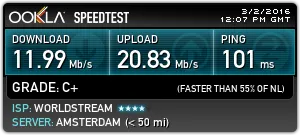
After measuring the speed using a VPN, we need to tell more about Double VPN technology. The main question is this technology whether increases your anonymity?
What is a Double VPN, Triple, Quad
The idea of the serial cascading VPN servers is fairly new to improve safety. The key is to transfer the traffic among multiple VPN servers sequentially.
The user connects to the first VPN server, then the traffic goes to the second VPN server. It turns out that traffic is encrypted twice.
Setting Double VPN does not differ from conventional VPN configuration, since the movement of traffic is configured on the VPN servers themselves.
Is it true that these technologies increase your anonymity? And why these services are offered by only a few services?
Learn whole truth about Double VPN, Triple VPN and Quad VPN.
Another idea how to increase own security come from the point of view of the geographical location of the servers. On the Internet it is called offshore VPN.
What is a offshore VPN
Different countries have different levels of legislation. There are strong countries with strong laws. And there are a small countries, the level of which does not allow to conduct information data protection.
Initially, the concept was used to refer to an offshore country in which fiscal policy is relaxed. These countries have very low business taxes. Global companies interested in legitimate tax avoidance in their own country, and offshore banks accounts in the Cayman Islands have become very popular.
Currently, in many countries already have restrictions on the use of bank accounts in offshore countries.
Most offshore countries are a small states located in remote corners of the planet. Servers in such countries more difficult to find and they are more expensive due to the lack of development of the Internet infrastructure. VPN server in such countries began to call offshore.
It turns out that the words "offshore VPN" does not mean anonymous VPN, and speaks only of belonging to the offshore territorial state.
Should I use an offshore VPN?
Offshore VPN provides additional benefits in terms of anonymity.
What do you think is much easier to write a formal request:
- the police department in Germany
- or to the police department on the island of Antigua-Barbuda
Offshore VPN is an additional level of protection. Offshore server is good to use as part of Double VPN chain.
It is not necessary to use only 1 offshore VPN server, and think that it is completely safe. It should be suitable for their safety and anonymity on the Internet from different sides.
Use the offshore VPN as an element to your anonymity.
And it is time to answer the most frequently asked question. Can an anonymous VPN service keep logs? And how to determine whether the service log is?
Anonymous VPN service and logs. How to be?
Anonymous VPN service should not carry logs. Otherwise, it can no longer be called anonymous.
We have compiled a list of questions to help you be able to accurately determine whether the logging server writes.
Learn more how to determine whether the VPN service is logging.
Now you have complete information about using VPN. This knowledge is enough to make themselves anonymous on the internet and make a safe transfer of personal data.
New VPN technology
Are there any new trends in the field of VPN?
We talked about the pros and cons of the serial cascading VPN servers (Double, Triple, Quad VPN).
To avoid disadvantages Double VPN technology can make a parallel cascade chains. We called it a Parallel VPN.
What is a Parallel VPN
Essence of Parallel VPN is to send traffic data channel in parallel.
The downside of technology serial cascading (Double, Triple, Quad VPN) is that each server happens channel decoding and encryption of the next channel. Encrypted data sequentially.
In Parallel VPN technology is no such problem because all the data are parallel double encryption. That is, imagine a onion, which has layers of peel. Likewise, the data held in the channel, which is encrypted twice.
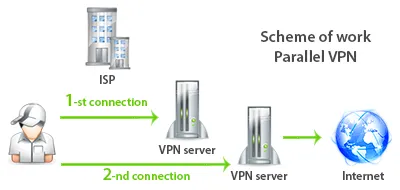
Learn more what is a Parallel VPN and how to use it.