Registration of new Socks accounts was opened. Currently, in new Socks accounts will not be present Socks in the U.S..
Send your request to create Socks account only if you DO NOT need Socks from the U.S.
All VPN with static dedicated IP began to support the RDP port forwarding. Port for OpenVPN connection is a standard - 3389. For the PPTP connection works port 3390.
Due to this feature it is possible to accept connections on the RDP port through Windows Remote Assistance, or use any other application.
We wish you a successful deals!
We try to provide the best service to our customers. And we believe in our success!
How to Setup PPTP VPN connection on Apple iPhone, iPod Touch, iPad
To setup a PPTP connection on Apple iPhone, iPod Touch, iPad, go to Settings -> General -> Network -> VPN.

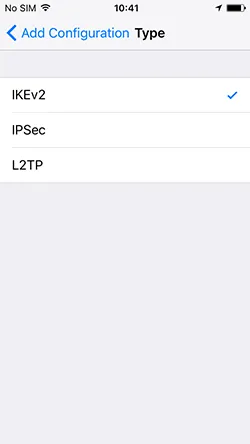
Click "Add VPN configuration".

In the next window fill in all required information for connection:
- Choose "PPTP" connection.
- In the field "Description" type the connection name, for example, "VPN - TheSafety.US".
- in the field "Server" type the IP address of the VPN server, for example, "109.169.47.109". You can see IP address in the section Subscriptions in the panel. If you bought the access to several servers, then necessary to create several PPTP connections.
- Type your Username VPN in the field "Account " . You can see this information in Subscriptions.
- Type your Password VPN in the field "Password". You can see this information in Subscriptions in the panel.
- Click "Save".

To connect to the VPN server, it is necessary to move the slider to the right side.

The connection is starting, wait until your iPhone connects to the VPN server.
When connection will be established successfully then you will see the icon "VPN" in the right top corner.

Advices from the service TheSafety.US
- Check the IP address after successful connection.
- If you have problems with connection, go to section FAQ -> General questions and VPN errors. There are answers to many questions there.
If you have any problems, apply to Technical support,
they will answer and help you!

En
Ru
De